Somehow this last year I have jumped into the world of WordPress plugin creation. I’m actually enjoying it. I have been a WordPress user since around version 2.0, or whatever version was out in April 2006. I have run very quiet blogs, like this, as well as a couple of higher traffic blogs such as my gadget block from 2006 to 2011. During this time I have modified plugins, fixed plugins, and become familiar with them from a distance. It turns out when there’s a million page views to a blog in a month that you start to see problems with some plugins. What I like about WordPress plugins is that you can fix them up, make them run more efficiently, and keep the site reliability high.
…Using Folders in the Add TaskPaper Shortcut for OmniFocus
I used Curt Clifton’s Populate Template Placeholders script in OmniFocus on my Mac a while back. I don’t know when or why this stopped working, but I assume it was when OmniFocus 4 came out. But rather than spend time troubleshooting it, I decided to switch my birthday reminder template to Apple Shortcuts. The benefit is that it works on all of my Apple devices. I have other templates that I also use and need to switch over.
The Template Placeholders script, or Apple Shortcuts set to add something to OmniFocus, makes it simple to set up projects when you need them. This is ideal for birthdays where you want a project each year to sort out presents and a card for an individual without manually creating a project each time with the date and times of everything you want to do to prepare for that.
Likewise, it is great for meetings where specific steps are needed before or after the meeting, such as emailing Zoom meeting details or booking a room, processing minutes and actions after the meeting, reminders, setting, etc.
The shortcuts are not particularly challenging to create, although I ran into issues getting the project placed in the correct folder. It took a bit of research to find the correct syntax. I tried various methods such as deep links like omnifocus:///folder/gXBOjxW8JqA or folder names like Family/Birthdays. Neither of them worked. What I found was that the correct format is simply Family : Birthdays
When running the shortcut, it now correctly places the project into the correct folder rather than dropping it in the inbox.
You can see this in the screenshot below:
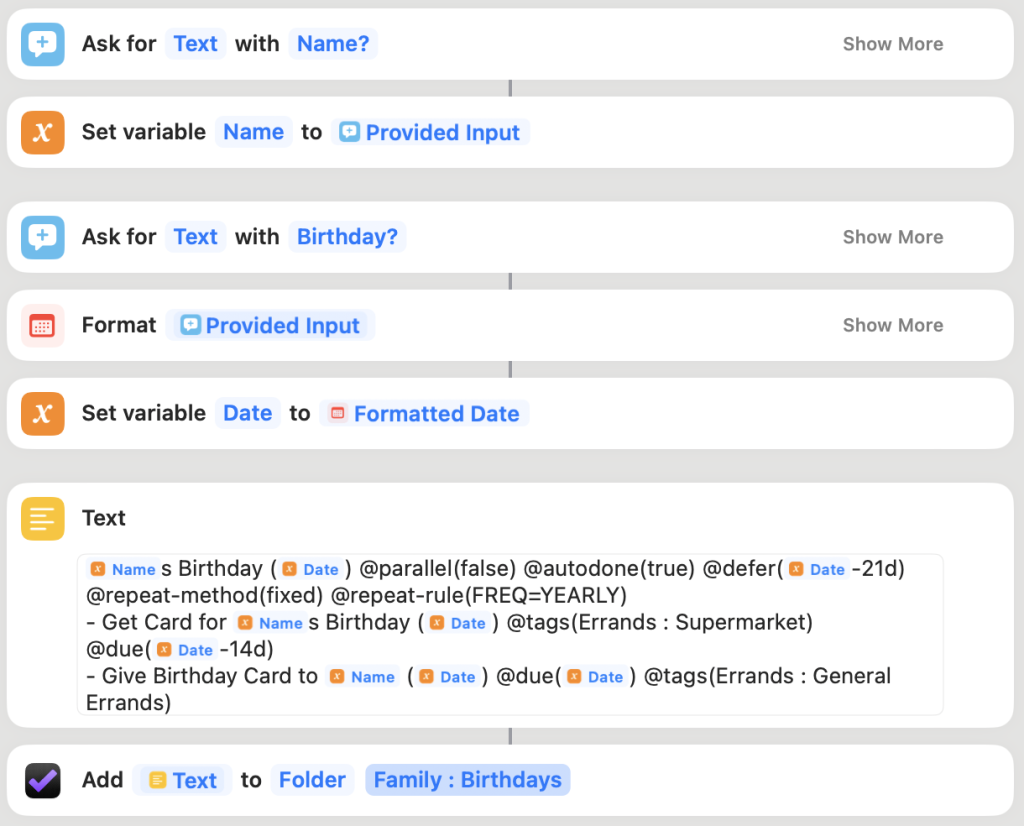
Here is a quick summary of what is happening for those new to adding projects to OmniFocus with Apple Shortcuts.
First, it prompts the user for the birthday person’s name. Then, it sets the provided input into a variable called Name.
It asks for the birthday date. It formats the date into something more friendly (you can click “Show More” to see various options available) and then sets that formatted date to a variable called Date.
The Text field contains TaskPaper format. Rather than creating the TaskPaper syntax myself, I manually build a project in OmniFocus and set all dates and notes precisely as I want (this is a sample project deleted when I have copied the task paper). I then select all items in the project, including the project name, and right-click and hit “Copy as TaskPaper”. I then paste this into the Text field and replace my fake names/dates in the text with the variables that I have. For the date on the project, I don’t want to see someone’s birthday next year as an item I need to action now, so I set a defer date to Date -21d, which reveals the project 21 days before the individual’s birthday.
When done, it uses the “Add TaskPaper” action using the Text just created. In the instance of this Birthday shortcut, I want all shortcuts to go into Family : Birthdays, so I select Folder in the action and then put the folder name as detailed above.
When running the shortcut, you get prompted in the order of the shortcut, so name and then birthday date. Thats it. The project is added to OmniFocus in the correct folder, and if it is more than 21 days away, it is deferred and only shows up when needed.
I can then repeat adding people with the short cut as needed.
Apple Shortcuts is extremely useful when you want to reduce the time it takes to create identical projects. Please post any questions, and I’ll help where needed.
Notic Meet Update
I haven’t written much about Notic recently, so I thought I best let you know where I’m at with it.
Progress has been slow recently. The main changes are just switching to Mongo Atlas from a managed Digital Ocean database. The change was relatively painful, given no live data to migrate.
After several attempts to get the correct connection string and specify the correct database name, all is “almost” working. The only outstanding issue is that what was id is now _id, so I need to look over what causes that and adapt as needed. I expect that to take up to 30 minutes to sort.
How I Plan to Write a Thousand Words a Day
I recall reading a blog post by Nathan Barry several years ago about writing 1,000 words a day. Back then, it struck me at how simple the idea was, but I quickly learned that being consistent at this is incredibly difficult. Many people who want to tackle this challenge will be able to come up with the first few days of content but will quickly find that ideas start to dry up. I don’t know how many times I have attempted this challenge—several times, at least.
Why 1,000 Words a Day
Before I explain how I will tackle this problem, I would like to point out that you can pick whatever number works for you. I happen to like the number of words chosen. Writing a thousand words doesn’t seem like a lot, but when compounded over time, that equates to 365,000 words per year if you stay consistent. Pick a number that’s manageable for you, and go for it.
Chris Guillebeau wrote about writing 300,000 words a year consistently for three years. One of the takes from this article is what it allows him to output. With a thousand words a day, he can write one book a year, 150+ blog posts, and create content for 2 – 3 business projects. Writing a small amount each day can make such a difference over time. Although it makes sense that the numbers would add up, it is still easy to overlook this. Instead of writing, I can sit dreaming about what I could write. So for me, this challenge has meaning.
My Actual Writing Goal
Like Chris, I aim to write 300,000 words a year. I plan to write from Monday to Saturday and then take a break on Sunday. Although I will write in my journal on Sundays as I do now, it will be very unlikely that anything I write on Sunday will be published.
What Qualifies in those Thousand Words?
Words that qualify for the count each day are intended to be published somewhere. I write quite a lot in my journal and have done it for years, but nobody will read that content. For this reason, I intend that to qualify that it needs to be published. That might not be immediately, but it will be published at some time.
Challenges
Writing daily has its challenges. I am aware of this, and I am sure many of you will be aware of it too. Only a few people I know of are consistent at keeping content flowing, and those who do are typically successful at what they do in their life and career.
Challenge 1 – Ideas Run Dry
Perhaps this is one of the most difficult challenges I have. When I begin with renewed energy to be more consistent at writing, I often do well for the first few days, sometimes for the first few weeks, but then it’s challenging to keep up motivation, especially when I struggle to come up with ideas.
One thing I have noticed over the last few years is that when I am creating things, in my case, writing apps for iPhone or doing backend/frontend work on a web app, I have lots of things I can write about. Yet, I don’t capture these ideas as they come to mind. I don’t make notes. I typically deal with the problems I am facing and then move on.
So here is the first thing I will be doing. I will begin making notes as I work, gradually recording bits of information at a time and storing them for when I need an idea to write about something.
Creating Every Day
To get those ideas, I need to be creating every day. Although I could get ideas when reading and watching other people’s work, the actual meaningful ideas come to me through my own creation and problem-solving. There’s a big difference between watching someone solve a problem or reading about how to solve a problem than there is figuring out how to solve a problem. You learn so much more doing it the latter way, and you have so much more to offer.
Second Brain
Over the last year, I have become more familiar with Tiago Forte’s work which he calls “Building a Second Brain”. For a long time, I have used technology to make notes, record meeting minutes, and save ideas, but none of it is in order of any useful benefit other than someone asking me if something was ever discussed somewhere. What strikes me about the second brain idea is that you can use it as a personal repository for storing ideas. A note on the front of the book says, “a proven method to organise your digital life and unlock your creative potential”. I haven’t finished reading the book yet, but from what I have read and seen of Tiago’s work over the last year, it is well worth purchasing.
Ideas are not things that will come to you in a time of need. They typically won’t come when you sit down to start typing on the keyboard. Ideas need to be found, written down, thought about, written about more, and then when needed, you can be ready to write what you learn.
The most significant part is consistently recording my ideas and making notes about what I do each day and interact with.
Find a Time Each Day to Write
One thing that helps me in other areas of my life is consistency. I’m not the type who can fit in something because there’s a gap in my schedule. I tend to work better when I schedule something beforehand and typically when I am consistent with the timing of it.
For me, I think the best time would be early morning to write when the family are still asleep and there are no distractions from phone calls and other goings on in the world.
One challenge of early mornings is waking up tired. Waking up earlier requires getting to bed at a good time. Getting to bed at a good time requires I change what I normally do in the evening and try to break that habit.
Tracking
One thing I have found helpful is a Mac and iPhone app called Streaks. I added a few things to track daily, such as working on my personal projects, writing 1,000 words, studying, walking, etc. Some of those are tracked automatically, but others, like journalling and writing, require that I log them. I’m on day 11 of a writing streak which is good for me. Today was one of those days where I would skip it, but I decided I wanted to keep the streak going. I aim to reach New Year’s Eve, having written 6,000 words per week.
Choosing What to Write About
In the first 11 days of my 11-day streak, I have just written with little planning beforehand. I have spent more time than previous attempts at coming up with ideas but haven’t put much organisation beyond that. What I plan to do after another week or so of writing is to start putting a writing plan together. I want to write with more purpose, such as creating an eBook on SwiftUI and iOS app development. When I plan that out, I will have an actual goal to work towards. Writing 1,000 words per day will be the vehicle that helps me reach my goals.
Switched to Fathom Analytics
I have been a user of Google Analytics since 2005, although I rarely even look in there. The only report I found interesting was the monthly report over a long period to see if my websites were growing. Since Google recently switched us all to GA4, finding simple information is frustrating. There was just too much info, and I wasn’t interested in almost all of it.

Learning SwiftUI–Again
I keep jumping around programming languages for the past few years. For work, I’ve been learning C# with .NET. Prior to that, it was Python and Vue.js, and before that, it was PHP, GraphQL and a few other things.
But I want to learn SwiftUI again, so I’ve started writing tutorials on my other blog. I have created three so far that show how to make requests to OpenAI to allow a user of an iPhone app to hold a conversation with ChatGPT. The three tutorials were fun to write and getting into SwiftUI again was good. The articles are:
- ChatGPT Integration: Building a SwiftUI Chatbot for Your iPhone App
- Integrating DALL-E to Generate Images in Your SwiftUI iPhone App
- Building a SwiftUI Note-Taking App with ChatGPT Integration for iPhone – Tutorial
One problem I keep facing with trying to learn SwiftUI is that I struggle to maintain time to learn each week. Each time I start learning it, I get sidetracked onto building something else in a different language, and yet, I still really like mobile dev, particularly for the iPhone.
…UserState in Notic Meet
Over the past month, we have been dedicating some time to getting the Visual Studio project for Notic Meet in a state where we can begin building the front end. It’s making progress, but it’s still being prepared.
Most recently, we collaborated to implement user state on the client side. We added a User property to a component that can be inherited by each page. This approach ensures that once a user successfully logs in, any page inheriting from the NoticComponent will have access to the User object. This User object can then be utilised to retrieve meeting IDs, user names, and other relevant details. The User property is read-only, with a getter but no setter.
Other notable progress includes incorporating created and modified dates into the models and successfully setting up the Discussion Point, Meeting, and User models. These models are now fully functional and can be persisted to the Mongo database, although the logic to add the correct IDs has yet to be added. We have the database designs for that and need to take the time to make sure that the documents reference the correct document(s).
It has been a slow few weeks, as usual, but progress is still being made. The backend is now at a stage where we can introduce new models, controllers, and services and develop the necessary logic. However, a few remaining tasks are required for authentication. The login and registration functionalities are working smoothly, and JSON Web Tokens (JWTs) are being generated upon login. These tokens are also stored in the browser’s local storage. However, at the moment, we need to utilise them for user authentication. To address this, we need to implement some middleware and make a few other adjustments, most of which we currently have a high-level understanding of, but now we need to get deeper into how that part works.
Please don’t hesitate to let me know if you have any more questions or need assistance with any specific aspect of our project. You can also visit Notic.
Notic Progress
I’m about nine months into a six-month app challenge—obviously, a product launch failure, and yet, progress is still being made, albeit slower than I wanted.
I have learned throughout these months that six months was ambitious and that accomplishing that on a big project requires longer hours each week and sustained effort, which I still need to improve.
I am still spending some time each week working on Notic, but I think to improve my output I need to consider smaller chunks of work daily rather than a few hours at a time once a week.
Help has come from a friend who joined the project several months ago. She has helped bring motivation and software engineering help to architect the app. She also helps with many other aspects, such as user stories, db design, and much more, which I am extremely grateful for.
What I am Working on Now
At the moment, I am working on the data context for the server side. It currently doesn’t have one and grabs data from the server as and when needed. The data context is being added to abstract server and caching so that instead of grabbing a user from MongoDb, I can grab it from the data context, and that will figure out if it has the item cached or needs to grab it from the server.
This part is tricky, especially with dependency injection and working generically. Being new to C# and .NET, I need to check tutorials. Many tutorials on data contexts show each type of data having its own data context, such as userDataContext, meetingDataContext, and so on. What I am aiming for is a single server data context so that I can access dataContext.Users or dataContext.Meetings. It almost works, but it’s not quite there yet.
Other progress that has been made is that user login is almost ready. It hashes the passwords and provides a JWT with claims. We still need to store the JWT and use that on each API call. This is almost working and should be ready soon.
As soon as login is functioning fully and the data context is added in, I feel progress will accelerate, especially on the frontend of things. When these things are ready we can work in slices and work through the app one step at a time and build the frontend and backend at the same time.
I’ll provide another update within the week regarding the login and data context. Feel free to ask questions.
Switching to C# for Notic Meet
I have recently been working on a C# .NET project. I like the language and framework. My background is in Objective-C, Swift, Python, and others. Now that I have a year’s experience in C# and .NET, I decided Notic Meet would be written in this language. I also now have a friend helping me with the project. Let me explain a bit about what has happened since I last wrote about Notic Meet.
…Notic Meet Update
In my last post, I wrote about setting up domains and getting everything in place that would allow me to write and create the app.
So far, I have set up notic.cc, running the Twenty Twenty theme. There is no content yet, although that will be coming soon. I have set it up with a static home page and have set it up so that notic.cc/blog can be used for product announcements as well as content about meetings and PMK. This particular domain is being used as the site for the Notic Meet and Notic PKM products. Eventually, there will be a web app and perhaps a community, but those are not in the six-month app challenge that I am doing.
…